Five Things I CANNOT STAND About A Bad Powerpoint:
1. Clutter: Use more than one slide if you have THAT much to say
2. Disorganization: There are templates for a reason. It's not that difficult to make sure the font is the same size and type!
3. Blurry Pictures: If the picture is poor quality, find another one to get your point across. I don't want to spend 5 minutes trying to figure out what the picture is.
4. Excessive Sound Effects: I don't want to hear a new sound effect after every word of the presentation. Do not, under any circumstances, use the typewriter sound effect!
5. Too small a font: I don't want to use a magnifying glass to read the powerpoint. Make it big enough for everyone to read it easily, even from the back of the room!
If all the gets sorted out, Powerpoint can be an extremely useful tool to communicate an idea. More specifically, Powerpoint is ideal for school presentations. With this program, you can link audio, video, graphs, charts, tables, and images to further explain your point or topic of discussion. Powerpoint makes it easy to present ideas in an organized, educational, and aesthetically pleasing way.
Thursday, October 21, 2010

Thursday, October 14, 2010
CLT Visit!
Today, I ventured down the the CLT Center for my first time since I've been at Trinity. I was absolutely amazed at how nice and high the entire room was. Every piece of equipment in there was top of the line, and there was also many staff members on hand who could essentially help you with anything you needed! One of the most interesting rooms in the CLT Center to me was the video conference room. The technology is unbelievable. The video conference room can support up to 20 high definition calls internationally, and up to 100 high definition calls on campus! It's amazing to think that at any given time, you can speak face to face with someone across the globe.
I was also surprised to find the amount of the other technology available to students, especially because things like video and photo editing aren't something used daily by every student on campus. Still, the university provides great software for the students who do find it helpful. Similarly, there is also a recording studio to where different tracks can be mixed, recorded, and produced. Overall, the CLT Center is an amazing resource that I am so glad I've been exposed to! We even got to learn how to use the scanners (for free!)

I was also surprised to find the amount of the other technology available to students, especially because things like video and photo editing aren't something used daily by every student on campus. Still, the university provides great software for the students who do find it helpful. Similarly, there is also a recording studio to where different tracks can be mixed, recorded, and produced. Overall, the CLT Center is an amazing resource that I am so glad I've been exposed to! We even got to learn how to use the scanners (for free!)

Thursday, September 30, 2010
Photo Manipulation
The picture I chose to evaluate from the “Pictures that Lie” website was the image entitled “Leon Trotsky.” I found this picture absolutely fascinating because although I had heard in various history classes that editing to this extent had been done, especially when looking back on the Soviet government, I had never been able to witness the alterations first hand. Looking at the first image, it is clearly a picture of Trotsky standing in a crowd a long a number of other Russians. In the released altered photograph, Trotsky has been completely eliminated by essentially blending his image, along with a few of his friends, into the background. At one point in time Trotsky was a very powerful man in Russia, but after his fall when he raised opposition to Stalin’s rise to power, he was an outcast. From this point on, the Russian government slowly tried to erase him from Soviet history. This is a perfect example of the censorship and the tight control that the Soviet government had, as they took the time and resources to remove Trotsky to make it appear as if he were never in the crowd of people celebrating the anniversary of the October Revolution that day.

The below video is definitely anti-photoshop in regards to using the photoshop tools to alter models in various magazines, newspapers, etc., due to the negative effect that it has on the self esteem on young girls around the world, as well as giving males an unrealistic idea of what women should actually look like. Similarly, the point is made in the video that excessive photoshop usage has become a huge problem in the media, causing an increase in eating disorders and depressions.
Wednesday, September 29, 2010
Excel
Excel so far has been a pretty eye-opening experience. Honestly, I had never really used Excel before, besides with school assignments such as Bio Lab or Chem Lab, and I never really thought about all the other ways Excel could be helpful in daily life. As far as budgeting goes, I'm awful, which is another reason that it was kind of exciting to see how practical knowing how to create a running balance in Excel can be. Similarly, keeping track of our grades like we do for this class will also be helpful in future classes. As far as Excel goes, I don't really dislike anything. Every time I open the program I learn how something else functions, and each time I do it just makes every task I assigned that much easier. I do appreciate how easy it is to organize everything in Excel as well. I'm one of those people that usually has receipts falling out of my wallet and loose papers in all the wrong folders. Excel is the perfect solution to the fact that I am organizationally challenged!
Wednesday, September 22, 2010
Copyright Issues
Jason Hardin’s lecture today was really interesting and extremely eye opening. Not until today did I realize how little I knew about copyright laws, even though they are prevalent in almost everything we do. Most of all, I found the information about different file sharing, specifically music related, most interesting. Honestly, I don’t know one person that is college aged, myself included, that hasn’t illegally downloaded at least a few songs illegally. Especially with the recent developments in modern technology, illegal file transfers are easier to make than ever. Although in the past I am definitely guilty of downloading music illegally off the internet, I’ve come to realize how important it is for music to be obtained legally, not only to stay out of trouble, but also to support the particular artist whose work is being stolen by thousands, if not millions of people a year. Even though it’s great to have access to any music you want, I think that both legally, and morally, it’s better to pay the $1.29 on iTunes, especially if it means avoiding thousands of dollars in fines later on in life.

Copyright Issues by Lauren Henderson is licensed under a Creative Commons Attribution 3.0 Unported License.
Copyright Issues by Lauren Henderson is licensed under a Creative Commons Attribution 3.0 Unported License.
Tuesday, September 14, 2010
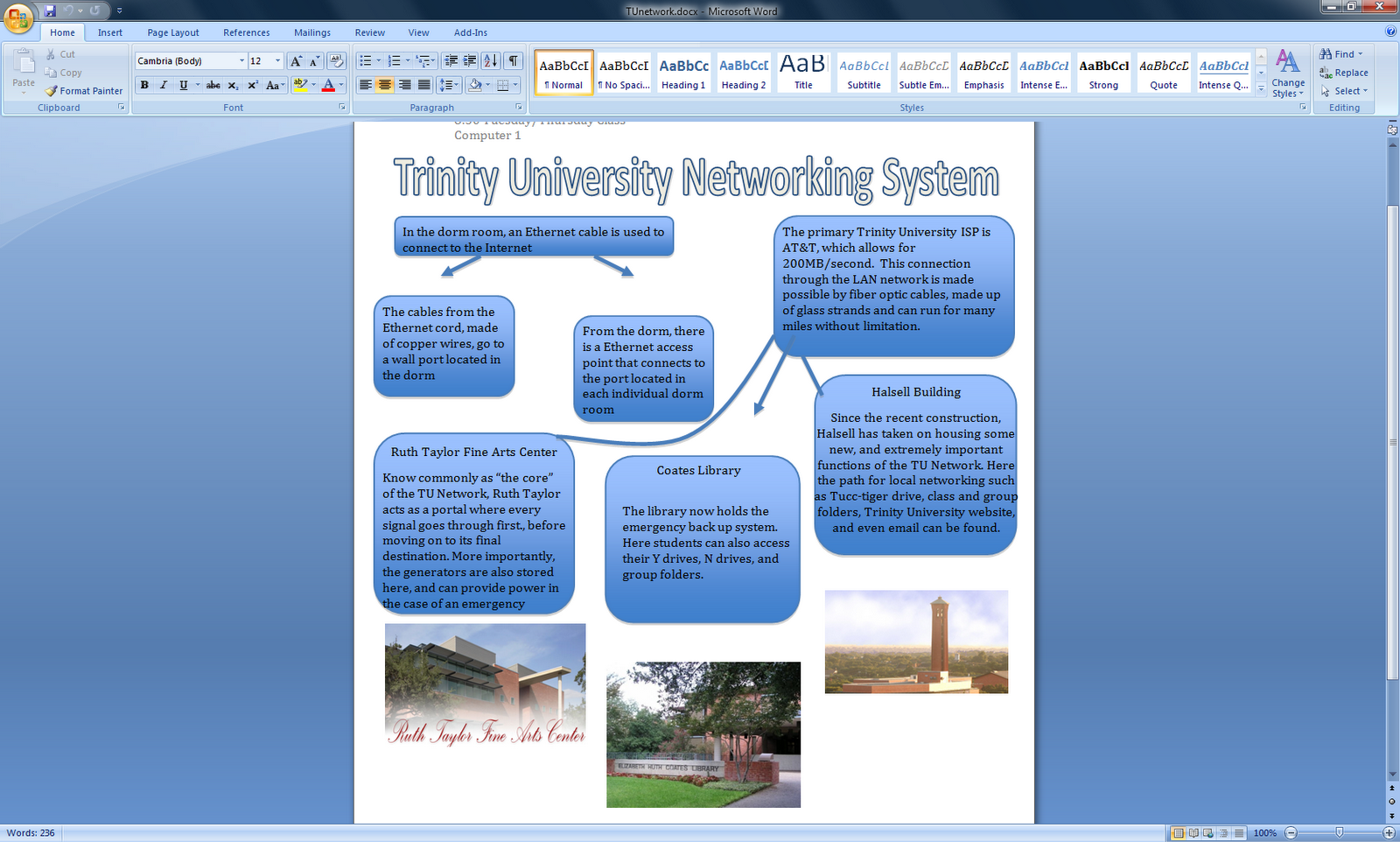
My Trinity Network Flyer
This is my Trinity Network Diagram. I used different shapes, text boxes, and image files to try to explan how the Trinity Network works. Right now, I wish I had not just looked at the homework document in my groups folder, because then I would have seen the extra part of the assignment needed to get full credit! Oh well, lesson learned.
Wednesday, September 8, 2010
Trinity Mystery Spot!

This location is a place that most upperclassmen, sophomores or older, have seen at one point or another in their time at Trinity whether it was going to their own room or visiting a friend. I chose this specific location because it is somewhere extremely ordinary, that is passed frequently without the slightest thought to the surroundings. I have adjusted the photograph using the Picnik website to make it a little bit more fun, and slightly harder to guess. To adjust the color scheme and make the photograph more interesting, I boosted the color, softened the edges, and added the HDR effect available on Picnik. Similarly, I also used Picnik to add a rectangular shape, text box, and symbol in effort to create the "No Robots Allowed" sign. Using the same shape tool, I added the robot that is placed on the stairs. Personally, I have nothing against robots, but that little guy with the angry expression was too cute to leave out of my edited photo. Can anyone tell me the precise location of this photograph? Leave your guesses in a comment! Thanks!
Subscribe to:
Posts (Atom)